Guides Running the job
Guides · SitesAI AppRunning the job on site
What happens after the job is won — the crew, the paperwork the site actually asks for, and keeping it in one place instead of five.
Winning the job is the easy half. Running it means knowing who is on site today, what they did, whether their ticket is still current, and what you can claim at the end of the month — usually while standing in a paddock with one bar of signal.
Most small civil businesses end up with a phone full of photos, a glovebox full of dockets, a spreadsheet of hours and a folder of expired certificates. None of them talk to each other, and the one the head contractor asks for is always the one nobody has.
These guides cover the parts that actually get asked for on an Australian site — signed dockets, a site diary that holds up, prestarts and defects, inductions and document expiry, timesheets that match what you billed — and the commercial chain behind them, from the accepted quote through to the progress claim. They are written against the SitesAI App, which is free for up to ten licences.
If you are still choosing, the comparisons put it side by side with the other apps on your shortlist.
Feature
 SitesAI App · Feature
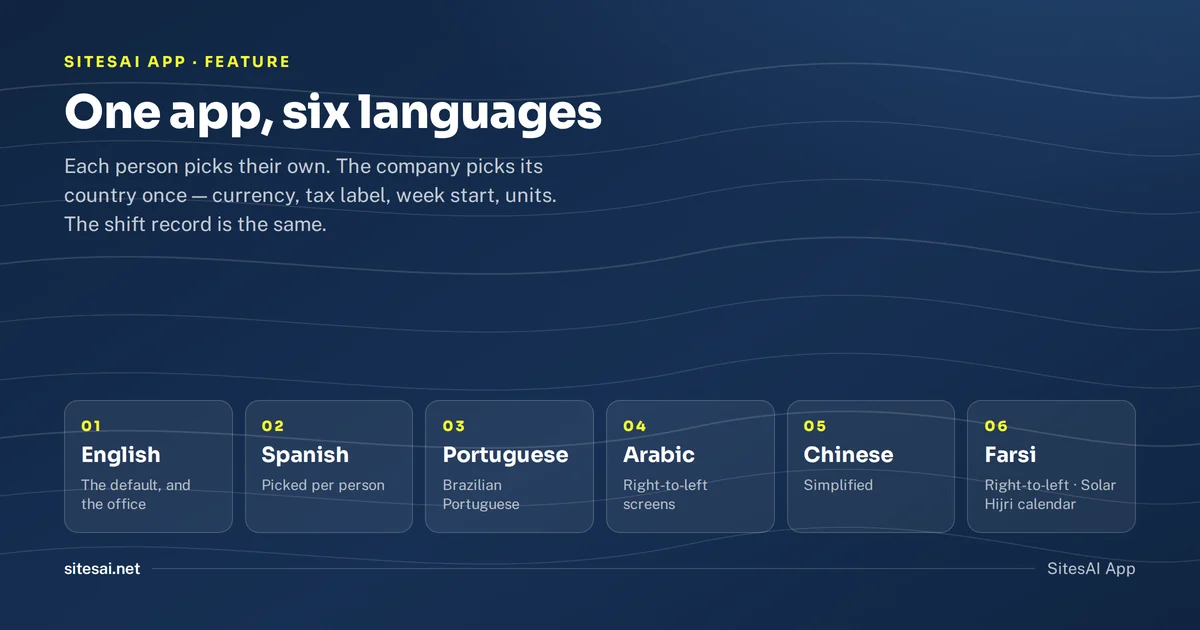
The SitesAI App now works in six languages
English, Spanish, Portuguese, Arabic, Chinese and Farsi, picked per person. What is translated, what is not yet, and how a wrong line gets fixed.
 SitesAI App · Feature
Point your AI at the job: 142 tools and a REST API
The SitesAI App hands its whole surface to an AI assistant. What the connector does, how scopes and audit keep it safe, and why sending stays human.
 SitesAI App · Feature
Clock-in that works where there is no signal
Most site apps fail in a black spot. How offline clock-in works, why the server referees every tap, and what geofence clocking does not track.
 SitesAI App · Feature
Give your client a login: the customer portal
A portal login lets a client see their jobs, accept quotes, sign dockets and do the prestart on hired plant. And nothing else at all.
 SitesAI App · Feature
Plant hire dockets: from a paper book to a signed PDF
Why paper dockets cost you money, and how a digital docket works — one per truck, signed on site by the customer with a QR code, out as a branded A4 PDF.
 SitesAI App · Feature
Guided Flows: the SOP your crew actually follows
A procedure nobody reads is not a procedure. How guided Flows walk a worker through the job, and why each step writes a real record.
 SitesAI App · Feature
Quote, scope, variation, claim — all one record
How the accepted quote becomes the agreed scope, variations get approved by a link and a typed name, and a progress claim freezes exactly what it reported.
 SitesAI App · Feature
Site compliance: a document wallet, not a folder of PDFs
Tickets and insurances belong to whoever holds them. How a wallet, per-site requirements and one compliance report replace the folder nobody trusts.