
Earthworks takeoff software for fast cut & fill
Turn PDF plans into clear cut & fill quantities. Check levels and batters in 3D before you price the job. All in your browser.
What is SitesAI Estimate?
SitesAI Estimate is browser-based earthworks takeoff and estimating software for civil and earthmoving contractors. Load a PDF, DWG or DXF plan, calibrate the scale, trace the work area and set the existing and design levels. It calculates the cut and fill volumes, shows the job as 3D terrain so you can check levels and batters, and turns the quantities into an estimate you can price and export to Excel or PDF. On the AI plan, AI auto-takeoff drafts the takeoff for you to review before anything is applied, and an MCP connector lets Claude, Codex or ChatGPT drive the same tools — with a free 14-day trial of the AI plan to try it on. It runs at takeoff.sitesai.net with a Google or Microsoft sign-in, and there is nothing to install.
Plans and prices (USD)
- Free: US$0. All markup tools and the 3D terrain view, drawing cut/fill boundaries and surfaces, view-only share links, local save and PNG export, on one sheet. The Free plan does not show cut and fill volume figures.
- Pro: US$39 per user per month, or US$390 per year. Everything in Free, plus cut and fill volume quantities, unlimited design sheets, Excel (.xlsx) and PDF export, and cloud sync with Google Drive or OneDrive.
- AI: US$99 per user per month, or US$990 per year. Everything in Pro, plus AI auto-takeoff and the MCP connector for Claude, Codex and ChatGPT, with AI credits included each month. Free 14-day trial — no card, one per account.
Paid plans carry a 30-day money-back guarantee. Current details are on the pricing page.
From PDF to priced — fast
Estimating that keeps every mark tied to the drawing, so your numbers are traceable and your reviews are quick.
01Measure the plan
Work from the PDF
Load the plan and draw platform boundaries directly on the drawing — no redrawing, no CAD export. See cut and fill from a PDF plan.
Live cut & fill
Quantities update as you draw, so you can test options and see the impact on volumes instantly.
02Review the job
2D markup, tied to the plan
Trace takeoffs, review areas and keep every mark linked to the drawing for clean handover.
3D terrain view
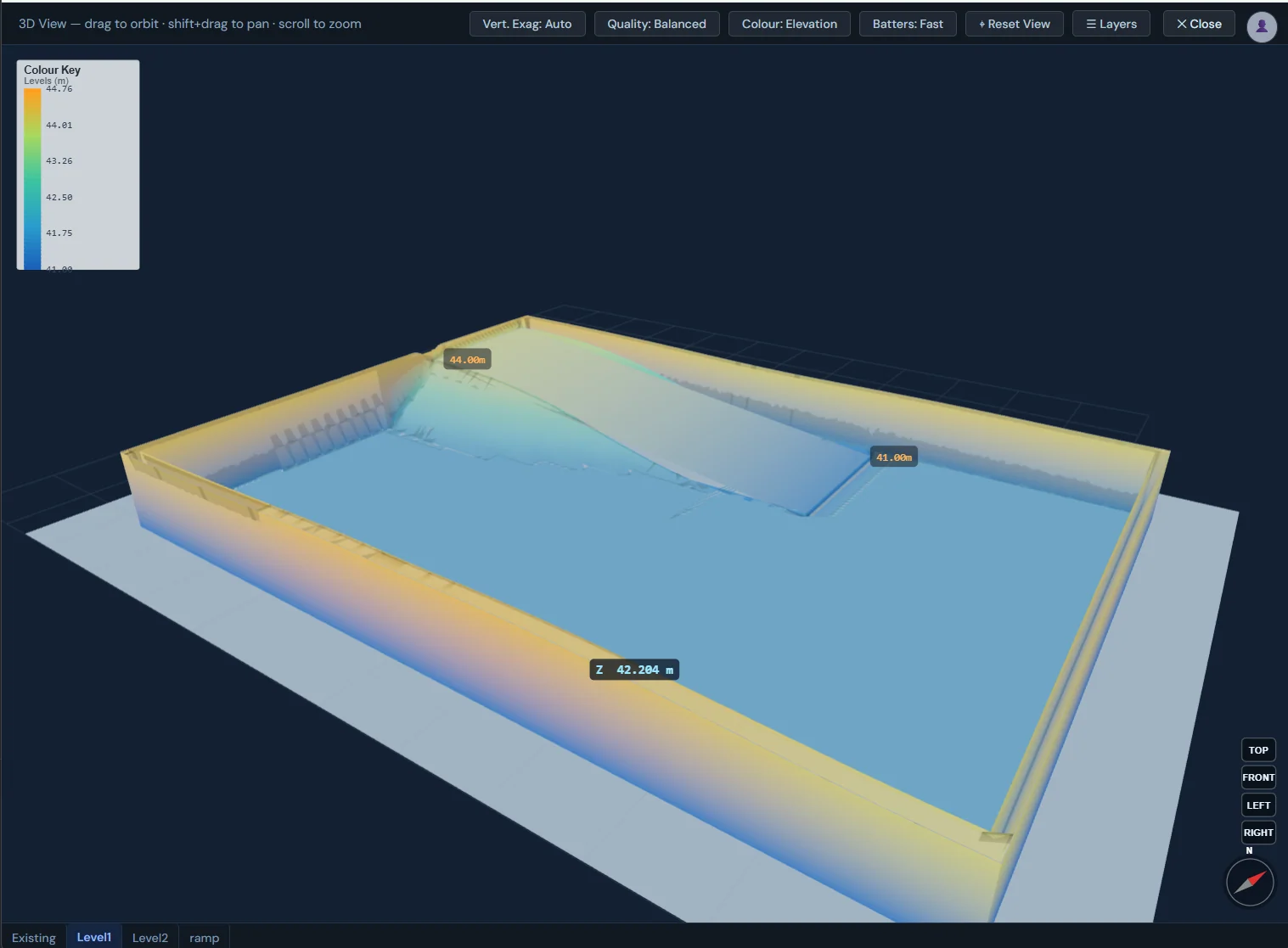
Open the same job in 3D to check levels, batters and pad shape — catch problems before site.
03Prepare the estimate
Levels, batters & pads
Review elevation colours and pad levels, and see how batters meet the existing surface.
Export your estimate
Take clean quantities out to your spreadsheet or estimate, ready to price. Working from CAD? DWG and DXF takeoff in the browser.
Estimate faster. Build with confidence.
The estimate and the 3D model are the same job — so the cut and fill you price is the surface you'll build. Spot a level clash or an awkward batter on screen, not when the machines are already on site.
- One job, 2D and 3D in sync
- Elevation colours & pad levels
- Review before you export
Three steps from plan to number
Load the plan
Drop in the PDF and set your scale. Your drawing becomes the workspace.
Draw the platforms
Trace boundaries and set levels; cut and fill update live as you go.
Check in 3D & export
Review levels and batters in 3D, then export clean quantities to price.
What you can check before you sign up
There are no testimonials and no claimed savings on this page. These are facts you can check for yourself before you create an account.
- There is a Free plan, with no time limit. Viewing, markup, drawing surfaces and the 3D view are free. Cut and fill volume figures and exports are the paid part.
- The prices are published. Every plan and its price is on the pricing page, in USD.
- 30-day money-back guarantee on any paid plan. If it is not right for your team, tell us and we refund it, and you keep your data.
- You sign in with Google or Microsoft. We never see your password.
- Where your project files go. On the Free plan a project saves locally. Pro adds cloud sync with Google Drive or OneDrive. A text DXF file is read in your browser.
- The AI connector is listed in the official MCP Registry as
net.sitesai/estimate. You can look it up in the registry.
Questions about SitesAI Estimate
What plan files can SitesAI Estimate open?
PDF, DWG and DXF. A PDF plan is calibrated by clicking two points a known distance apart. DXF files (R12 to 2018) open in the browser with their own units, and DWG files (R14 to 2018) are converted on our server and open the same way. See DWG and DXF takeoff in the browser.
How does SitesAI Estimate work out cut and fill?
It compares two surfaces inside the boundary you trace: the existing ground, from spot levels or contours you place or import from a survey DXF, and the design surface, from the platform levels and batters you set. The volumes are geometric, so you add your own bulking and compaction allowances as priced lines. The steps are in cut and fill from a PDF plan.
How much does SitesAI Estimate cost?
The Free plan is US$0. Pro is US$39 per user per month, or US$390 per year. The AI plan is US$99 per user per month, or US$990 per year, and has a free 14-day trial — no card, one per account, started from the app. Prices are in USD, billed per seat, and paid plans carry a 30-day money-back guarantee.
What does the Free plan include, and what does it leave out?
Free includes all the markup tools, the 3D terrain view, drawing cut/fill boundaries and surfaces, view-only share links, local save and PNG export, on one sheet. It does not include cut and fill volume figures, unlimited design sheets, Excel and PDF export or cloud sync. Those are part of Pro.
What does AI auto-takeoff do?
It reads the plan and proposes takeoff geometry, such as boundaries, areas and counts, as a first pass. Nothing is applied to your project until you review and accept it. It is part of the AI plan, and runs are metered as credits, with credits included each month. More in AI auto-takeoff: what it does and how you check it.
Can Claude, Codex or ChatGPT run a takeoff in SitesAI Estimate?
Yes. SitesAI Estimate has an MCP connector with 22 tools, so an AI assistant can open a plan, calibrate the scale, draw the takeoff and price the estimate, live in your open browser tab or in the background. The connector needs the AI plan — start the free 14-day trial in the app to try it. Setup is on the AI connectors page.
Price your next job in SitesAI Estimate
Open SitesAI Estimate in your browser and turn a PDF into a takeoff today — then manage the build with the SitesAI app.