
Guides Earthworks takeoff How-to
Earthworks estimate in Excel — strip, cut, fill, haul, compaction
The lines an excavation estimate in Excel needs, which volume each line is priced on, and how to keep the quantities tied to the takeoff.
Most small earthworks firms still price in Excel, and there is nothing wrong with that. What goes wrong is the quantities: typed in once, never updated, and priced on the wrong volume.
This page lists the lines an earthworks estimate needs, says which volume each one is priced on, and shows a layout that keeps the spreadsheet honest.
The lines
| # | Line | Unit | Priced on |
|---|---|---|---|
| 1 | Site establishment and set-out | item | lump sum |
| 2 | Topsoil strip and stockpile | m³ | bank volume of the strip (area × depth) |
| 3 | Bulk excavation (cut) | m³ | bank volume |
| 4 | Load and haul on site | m³ | loose volume (bank × swell) |
| 5 | Place and compact fill | m³ | compacted volume |
| 6 | Cart away surplus, or import shortfall | m³ or t | loose volume (tip fees often by tonne) |
| 7 | Trim subgrade | m² | area |
| 8 | Respread topsoil | m² or m³ | area × depth |
| 9 | Testing (density, proof roll) | item | number of tests |
Rock, dewatering and unsuitable material are separate lines with their own rates — never a bigger factor on line 3.
Which volume goes where?
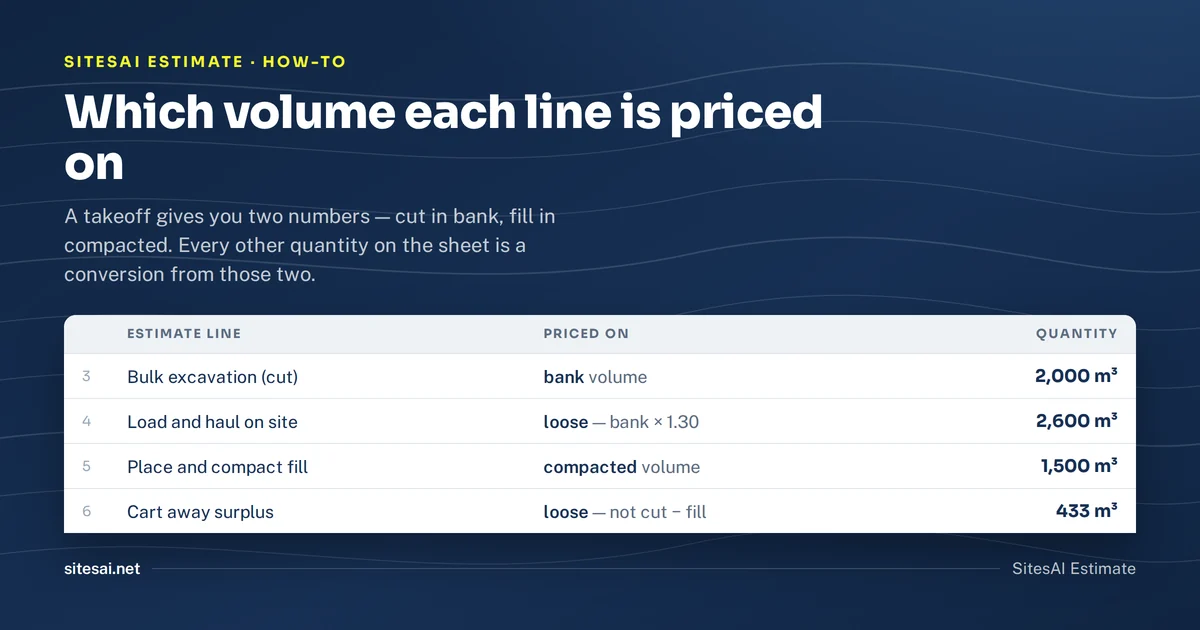
The takeoff gives two volumes: cut in bank cubic metres and fill in compacted cubic metres. Every other quantity is a conversion from those two, using the swell and shrink factors for the material (see soil bulking and shrinkage factors for a working table).
Worked from the same example as that guide — 2,000 m³ clay cut, 1,500 m³ fill, swell 1.30, shrink 0.90:
- Line 3, bulk excavation: 2,000 m³ bank.
- Line 4, load and haul: 2,000 × 1.30 = 2,600 m³ loose.
- Line 5, place and compact: 1,500 m³ compacted.
- Line 6, cart away: (2,000 − 1,500 ÷ 0.90) × 1.30 = 333 × 1.30 = 433 m³ loose.
Price line 6 on 500 m³ (the raw difference) or on 650 m³ (the raw difference with swell) and you have priced a truck-load of dirt that does not exist.
A layout that stays honest
Keep three blocks on the sheet, left to right:
- Quantities — pasted from the takeoff, one row per area or element, never typed. Include the material and the factors next to each volume so a reviewer can see what was assumed.
- Conversions — formulas only: loose = bank × swell, bank needed = compacted ÷ shrink, surplus = cut − bank needed.
- Pricing — rate × the right quantity from block 1 or 2, then totals by stage.
When the drawings change, you replace block 1 and the rest follows. If a number in the pricing block was typed by hand, it is the one that will be wrong at the next revision.
What are the common spreadsheet mistakes?
- Pricing haul on bank volume. The trucks carry loose material; bank under-counts loads by the swell.
- Pricing the strip inside bulk cut. Topsoil rarely goes back in structural fill; keep it separate so it is not counted as usable fill.
- One factor for a layered site. Split the cut at the material change from the geotech report.
- Totals that ignore sheets or stages. A multi-sheet job needs a total per sheet and a grand total, or a sheet goes missing.
Getting the quantities out of the takeoff
In SitesAI Estimate the Excel export already lays out block 1 for you: an Elements tab (and one tab per sheet, with totals) carrying material, swell and compact factors, cut, fill and net volume, cut and fill area, depths, loose cut volume and compacted fill volume for every element. An Estimate tab lists the priced lines by stage with unit, quantity, rate and cost, and a Schedule tab rolls them up by stage.
So you can keep pricing in your own workbook: measure in the takeoff — calibrate the plan, then cut and fill from a PDF plan — export, and paste the Elements tab into block 1. The quantities stay tied to the drawings and the spreadsheet does what it is good at.
Questions people ask
What lines does an earthworks estimate need?
At minimum: site establishment, topsoil strip, bulk cut, fill placed and compacted, cart-away or import, and trimming. Add rock, dewatering and testing as separate lines when the job has them.
Which volume do I price each line on?
Excavation on bank volume, load and haul on loose volume, fill placement and compaction on compacted volume, and trimming on area. Mixing them up is the most common spreadsheet error.
Should the quantities be typed into the spreadsheet?
No. Paste or export them from the takeoff and keep them in their own columns, so a re-measure updates the estimate instead of leaving an old number behind.
Is a spreadsheet enough for a tender?
For a small job, often yes. The risk is not Excel itself but quantities that drift away from the drawings — keep one source for the quantities and let the spreadsheet do the pricing.
Try it on your next plan set — free.
Sign in with Google or Microsoft, add a PDF or DWG/DXF, and see cut and fill in minutes. Pro is US$39 per user per month, the AI plan has a free 14-day trial; cancel any time. What SitesAI Estimate does.